
Question: Is it legal to install a television, video screen or dash camera in a motor vehicle? The answer depends on what the equipment does, what it displays, whether the driver can see the display and, in some circumstances, the class of driver's licence. Modern vehicles increasingly use electronic displays for entertainment, navigation and vehicle information. British Columbia's laws place limits on what a driver may view or operate while driving.
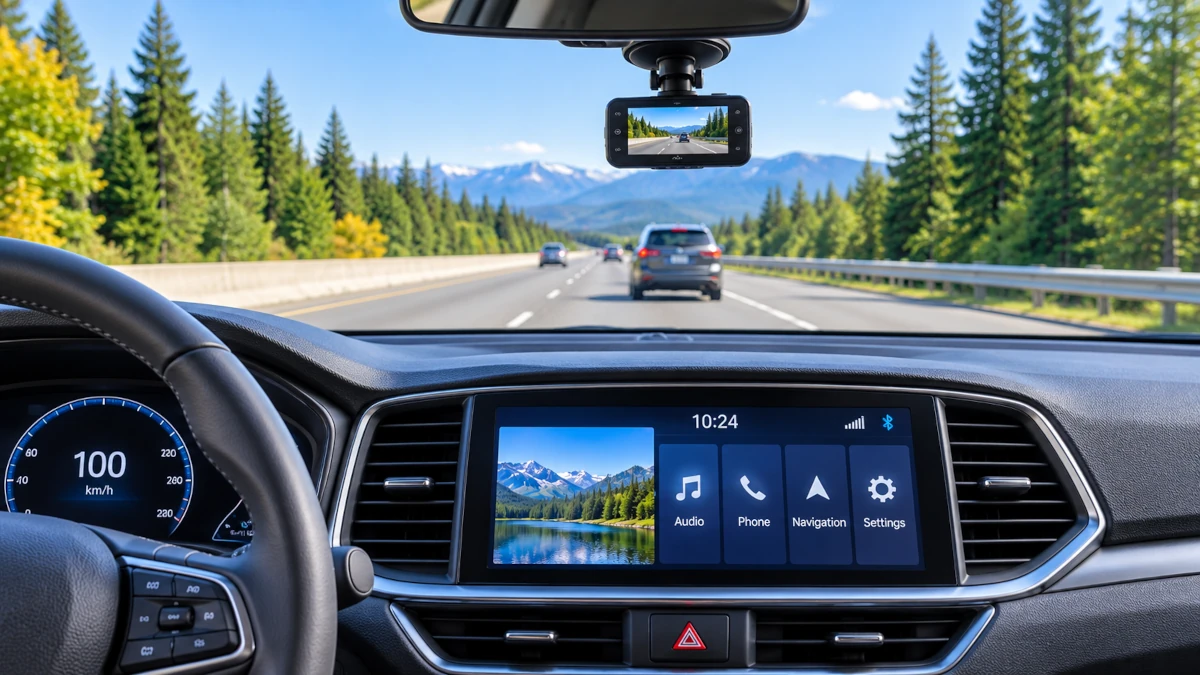
Television - Definition and Use
The term television is not defined in the Motor Vehicle Act or its regulations. In the absence of a legal definition, the ordinary dictionary meaning of the word is used. Television combines tele, meaning at a distance, and vision, meaning seeing. A standard dictionary describes a television as equipment with a screen that displays moving pictures and sound.
Modern vehicle entertainment and information systems have developed considerably since the legislation was written. A screen in a vehicle that displays moving images may be considered a television even though it is integrated into the dashboard rather than being a conventional television set.
Section 11 of the Use of Electronic Devices While Driving Regulation governs the use of televisions in vehicles:
11 (1) Except as provided in subsection (2), a person must not drive or operate a motor vehicle on a highway in which the image displayed from a television in the vehicle is visible to the person.
(2) Subsection (1) does not apply if the image on the television displays pictures, information or data solely designed to assist the driver in the safe operation of the vehicle or the safety and security of its load or its passengers.
(3) The exception in subsection (2) does not apply to a person driving or operating a motor vehicle under a Class 7 or 7L licence.
A fully licensed driver may therefore view certain vehicle information displays, provided their images are solely designed to assist with safe vehicle operation or the safety and security of the vehicle's load or passengers. Entertainment images, movies and television programs do not qualify for this exception.
A Class 7 or 7L driver does not have the benefit of this exception. A television displaying information intended to assist with safe vehicle operation must not display images visible to a driver holding one of these licences.
A screen installed for passenger entertainment must be positioned so that its images cannot be seen by the driver. The important consideration is not simply where the screen is mounted, but whether the images it displays are visible to the person driving.
What About Dash Cameras?
Dash cameras have become common equipment in private vehicles. They continuously record the view through the windshield and may provide useful evidence when a collision or other incident occurs.
Dash cameras are not specifically named in the list of prescribed electronic devices in section 3 of the Use of Electronic Devices While Driving Regulation. A camera that records automatically, without requiring the driver to operate it or watch a display, is different from a device used for entertainment or navigation.
Consequently, the mere presence of a recording-only dash camera in a vehicle does not, by itself, establish that the driver is using an electronic device in a manner prohibited by the legislation.
A camera equipped with a screen displaying live video presents a different question. If the screen displays moving images and falls within the ordinary meaning of a television, section 11 may apply. A driver must not have images displayed from a television visible to them unless the statutory exception applies.
This distinction is particularly important for Class 7 and 7L drivers. They cannot rely on the exception for displays intended to assist with safe vehicle operation. A prudent approach is to ensure that any display is switched off and cannot be seen by the driver. Drivers should not operate or adjust a camera while the vehicle is moving.
There is also a separate restriction when taking an ICBC road test. ICBC advises that audio, video and other recording devices cannot be used during a road test. GPS and navigation systems must also be turned off. Use of these devices can result in cancellation of the test. This is an ICBC road-test requirement, not a general prohibition against having a dash camera in a vehicle during ordinary driving.
Installing Electronic Equipment
Electronic equipment must not interfere with the driver's ability to see the road. Section 195(1) of the Motor Vehicle Act states:
A person must not cause a vehicle to move on a highway if
(b) the view of the driver to the front or sides of the vehicle is obstructed.
This applies to any object that obstructs the driver's view, not just electronic equipment. A television, display, GPS unit, dash camera, phone mount or other accessory must not be positioned where it interferes with the driver's view to the front or sides.
Section 4 of the Use of Electronic Devices While Driving Regulation also requires televisions, GPS units and electronic devices with hands-free telephone functions to be securely fixed to the vehicle and installed so that they do not obstruct the driver's view or interfere with the vehicle's safety or operating equipment.
Mounting a dash camera near the rearview mirror does not automatically make its installation acceptable. Its position must still be assessed to ensure that it does not obstruct the driver's view. The camera should also be securely attached so that it cannot become a hazard if the vehicle stops suddenly or is involved in a collision.
Also consider the vehicle's airbag system when choosing a mounting location. Do not attach a dash camera or its wiring to an airbag cover or where it could interfere with airbag deployment. This includes possible deployment areas around the windshield pillars and along the roof. Check the vehicle owner's manual and the dash camera manufacturer's installation instructions before choosing a location. If you are unsure, ask the vehicle manufacturer or a qualified installer. Transport Canada's guidelines for in-vehicle visual displays also recommend keeping equipment out of an airbag's deployment path.
In-Vehicle Entertainment and Distraction
Modern infotainment systems combine audio entertainment, navigation, telephone functions, vehicle settings and other features in a single dashboard display. Some vehicles also allow passengers to watch video while the vehicle is moving.
Even when a particular activity is not prohibited by the electronic-device legislation, interacting with a display can distract the driver. Looking away from the road to select entertainment, adjust settings or find information takes attention away from driving.
Drivers have a limited amount of attention available. Dividing it between driving and other activities can reduce their ability to recognize hazards and respond to changing traffic conditions.
Vehicle manufacturers increasingly place functions that were once controlled by physical switches and buttons into touchscreens. Finding and operating these controls can require drivers to look away from the road. The fact that a vehicle provides a particular feature does not mean that using it while driving is necessarily safe or lawful.
Minimize Your Risk
Set up navigation, entertainment and other vehicle systems before beginning a trip. Passengers can assist with adjustments that would otherwise distract the driver.
Do not watch videos or entertainment programs while driving. Avoid interacting with touchscreens and other electronic equipment when your attention should be on the road. If you need to make a call, change a setting or deal with a device, find a safe and lawful place to park first.
Install accessories carefully. Keep the windshield and windows clear, avoid placing equipment in the driver's field of vision and make sure that anything mounted in the vehicle is secure.
Technology can make driving more convenient, but it should never interfere with the driver's ability to see, control and safely operate the vehicle.
Learn More
- Log in to post comments