
 Adaptive Cruise Control (ACC) is an advanced driver assistance system designed to make highway driving easier and more comfortable. Unlike traditional cruise control, which only maintains a single set speed, ACC uses sensors to track vehicles ahead of you. It automatically brakes and accelerates to keep a safe, pre-set following distance.
However, ACC is a convenience feature, not an autopilot system. To stay safe on British Columbia roads, every driver needs to understand the system's strict limitations and operating rules.
IMPORTANT: Only Use on Dry Roads
Never use any form of cruise control—traditional or adaptive—on wet, snowy, or icy roads. When traction is compromised, your feet belong on the pedals, not the computer.
- Hydroplaning Risks: If your tires lose traction on standing water, traditional cruise control may accelerate to maintain speed, causing a dangerous, uncontrollable skid.
- Delayed Sensor Reactions: ACC sensors monitor the distance to the next car, not tire grip. The system cannot predict black ice, slush, or sudden hydroplaning.
- Loss of Kinetic Feedback: Driving manually allows you to feel changes in road traction through your steering wheel and pedals, giving you an early warning that automated systems miss.
Consult Your Vehicle's Owner's Manual
Do not assume your ACC works the same way as a system in another car or a rental vehicle. Before using ACC, open your owner's manual to learn your vehicle's specific traits:
- Operating Range: Find out if your system works all the way down to a stop-and-go crawl, or if it automatically shuts off at lower speeds (e.g., below 30 km/h).
- Sensor Placement: Identify where the radar units and cameras live so you can keep them clear of mud, heavy rain, snow, and winter road salt.
- System Alerts: Learn the unique dashboard symbols and chime sounds that signal when the system is turning off or requires immediate emergency braking.
- Customization Steps: Review how to change your following distance gap and how to toggle back to standard, non-adaptive cruise control if preferred.
Tip: Manufacturers use many different names for this feature, including Active Cruise Control, Radar Cruise Control, and Intelligent Cruise Control. If you do not have your physical manual, you can explore how different systems work through My Car Does What's Adaptive Cruise Control Guide.
Setting Your Following Distance (Aim for 3 to 4 Seconds)
Your ACC system allows you to select how closely you follow the vehicle ahead. These settings, usually shown as bars on your dashboard, represent a time gap, not a fixed distance. As your speed increases, the physical distance automatically grows to maintain that time buffer.
Highway Standard: For highway speeds, always adjust your controls to maintain a 3-to-4 second gap. While many vehicles default to a tighter 1-or-2-second gap upon startup, this does not leave enough room for emergency braking at 100 km/h. At high speeds, a 3-to-4 second cushion ensures both you and the automated system have time to react if traffic stops suddenly.
Critical Limitations to Remember
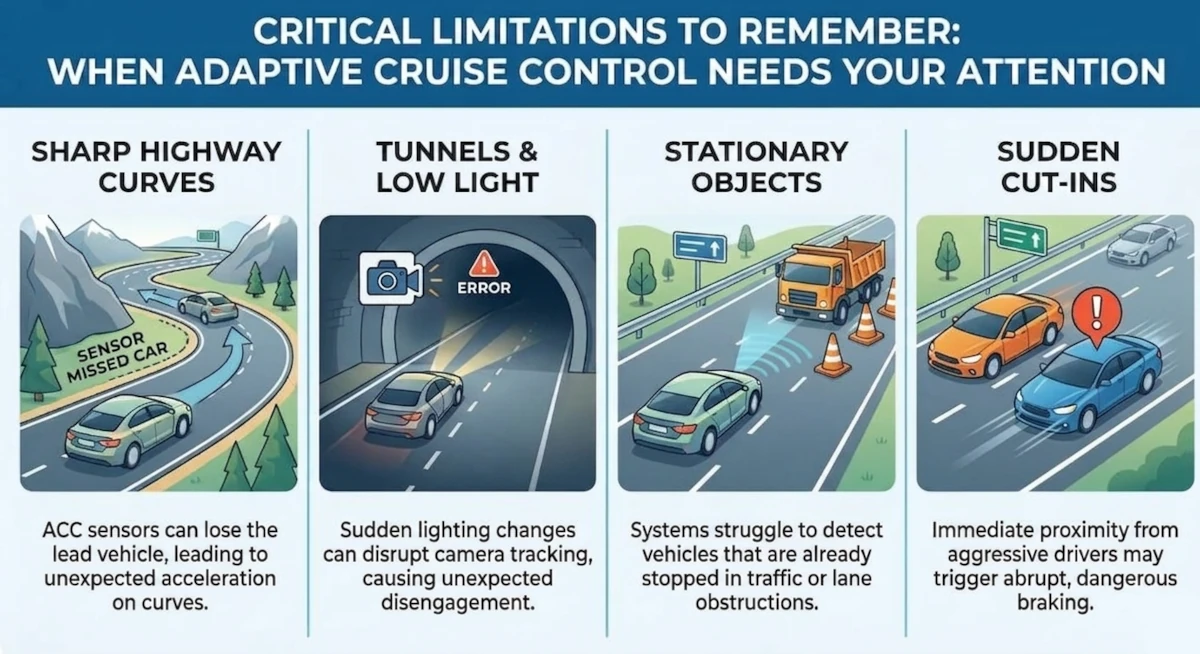
Visual guide outlining four common scenarios where automated tracking systems fail.
Even on perfectly dry roads, ACC has blind spots that require your full attention:
- Sharp Highway Curves: On winding BC highways, ACC sensors can temporarily lose the vehicle ahead or mistake a car in the next lane as a hazard, causing unnecessary braking.
- Tunnels: Dark or poorly lit highway tunnels can interfere with camera-based ACC tracking, causing the system to abruptly drop out.
- Stationary Objects: Most systems struggle to detect stopped traffic, construction cones, or stalled vehicles ahead until it is too late.
- Sudden Cut-Ins: If another driver cuts tightly into your lane, the system may react with abrupt, harsh braking that could surprise drivers behind you.
The Driver's Perspective: Pros and Cons in Real Traffic
Living with Adaptive Cruise Control reveals a unique balance of mental freedom and automated quirkiness that every driver should expect:
- The Big Plus (Better Situational Awareness): Because you do not have to constantly look down at your speedometer or micro-adjust your throttle, ACC frees up significant mental energy. This allows you more time to scan the environment, monitor surrounding lanes, and spot potential hazards much earlier.
- The Downside (Uncomfortable Braking Habits): Many drivers find that ACC does not slow down or stop as early or as smoothly as a human would. The system often stays at full speed longer than feels comfortable before applying a firmer, more abrupt brake. Knowing this tendency means you must remain ready to manually override the system and brake early if traffic ahead is slowing down rapidly.
Best Practices for Safe Driving
- Stay Fully Engaged: Keep your eyes on the road and your hands on the wheel at all times. ACC is a driver-assist tool, not autonomous driving.
- Maintain Foot Readiness: Hover your foot near the brake pedal so you can override the computer instantly if needed.
- Override When Necessary: Be ready to manually take control in complex environments, such as construction zones or busy highway merge points.
Help keep BC roads safe! If you found these safety tips useful, please share this post using these buttons.
- Log in to post comments
Comments
I've driven quite a few different cars that have adaptive cruise control. Annoyingly, I have NEVER found one that allows you to set more than 2.5 seconds following distance. That seems to be the maximum they will allow.
- Log in to post comments
Not Enough Following Distance